Mojo Experience is an AI document-processing platform built at MojoTech. It reads our statements of work and contracts, among our most sensitive documents, and makes them searchable through chat without exposing who we worked for or what we charged. We use it internally, and it also serves as a working reference for our clients on what it takes to run AI securely over sensitive documents.
In my last post, I described building Mojo Experience with a team of AI agents and deliberately left out what the product does. This post covers that, and seven lessons from building it. Few of those lessons are about volume. At about $0.14 per document for a first pass, even 300,000 documents would cost around $43,000 before any reprocessing. The harder problems were mixed document types, two access levels, and data that needed cleaning before any AI could use it. Figures come from the project repository and production checks in 2026.
What Mojo Experience does#
MojoTech’s statements of work (SOWs) and contracts describe nearly everything we have delivered: the problem, the approach, the architecture, and the team. They are also among our most sensitive documents, because they name clients, rates, and people.
Mojo Experience reads those documents from a shared drive and makes them searchable through chat. People can ask whether we have done similar work, which projects used a given technology, or who has relevant skills. An opportunity evaluator compares a new request with our past work and our people’s skills, and reports the gaps.
The product serves two audiences. A small group of administrators sees the full documents. Everyone else sees a sanitized version that keeps the overview, approach, architecture, and staffing, and removes client identity, rates and other financial terms, and personal information.
Staff can also query the sanitized collection from Claude through an MCP server, which has its own sign-in, rate limits, and an audit record for every call.
Don’t ask the AI to keep a secret#
At its core is retrieval-augmented generation, or RAG: the system finds relevant passages, and the model answers only from them, with citations. A typical RAG setup indexes whatever is in a folder, searches a single index, and filters results by who is asking. That works when a person may see a whole document or none of it. Our requirement was different: everyone may see what we did and how, but not who did it or at what price.
With only the full index, the model would see sensitive text on every question and have to strip it out on the fly, a probabilistic step that runs on every call, can slip, and can be coaxed. So a gate first decides what each document is, then indexes each document twice: in full for administrators, and as a separately sanitized copy for everyone else. A sanitized search reads an index that simply holds no sensitive text. It also keeps answers fast, because the expensive rewrite and validation happen once per document instead of on every question.
Keeping a separately sanitized copy is an established security pattern. Less common is validating that copy with several independent checks and involving a person before anything is published. That does not make leaks impossible. It makes them rarer, checked by people first, and limited to what got past every layer.
Around that core, a planner turns each question into several searches, structured project profiles answer the “list every…” questions that passage search cannot, and sanitized answers get a final check after the model writes them. Most of the difficulty lies in retrieval, not the model.
The architecture in plain terms#
Each new or changed file is copied from the drive into a restricted storage area. A document-type gate decides what the file is and whether it should be processed. Approved files then go through two independent branches. The sensitive branch extracts and indexes the full text. The sanitized branch rewrites the document to remove protected details, and a validation panel checks the result with deterministic pattern checks, a managed guardrail, and AI judges. A document is published only if it passes every check. Anything that fails goes to quarantine with the reason recorded, for an administrator to review.
None of that text goes to an outside AI provider. Every model in the pipeline, including Claude, runs through Amazon Bedrock inside our own AWS environment, alongside the documents themselves. Bedrock does not use our prompts or answers to train models and does not share them with the companies that build the models. Requests stay in US regions, and each part of the pipeline may call only the exact models it needs. The one route out is the MCP server, and it returns only sanitized text.
Data processing, the web application, and development run in separate cloud accounts. The backend determines access based on the signed-in user’s group membership, not in the browser. Development uses synthetic documents generated for testing, so real client data never reaches the environment with looser controls. Employee skills data arrives through our existing Databricks reporting layer rather than straight from the source system, which keeps pay and cost data out of the product.
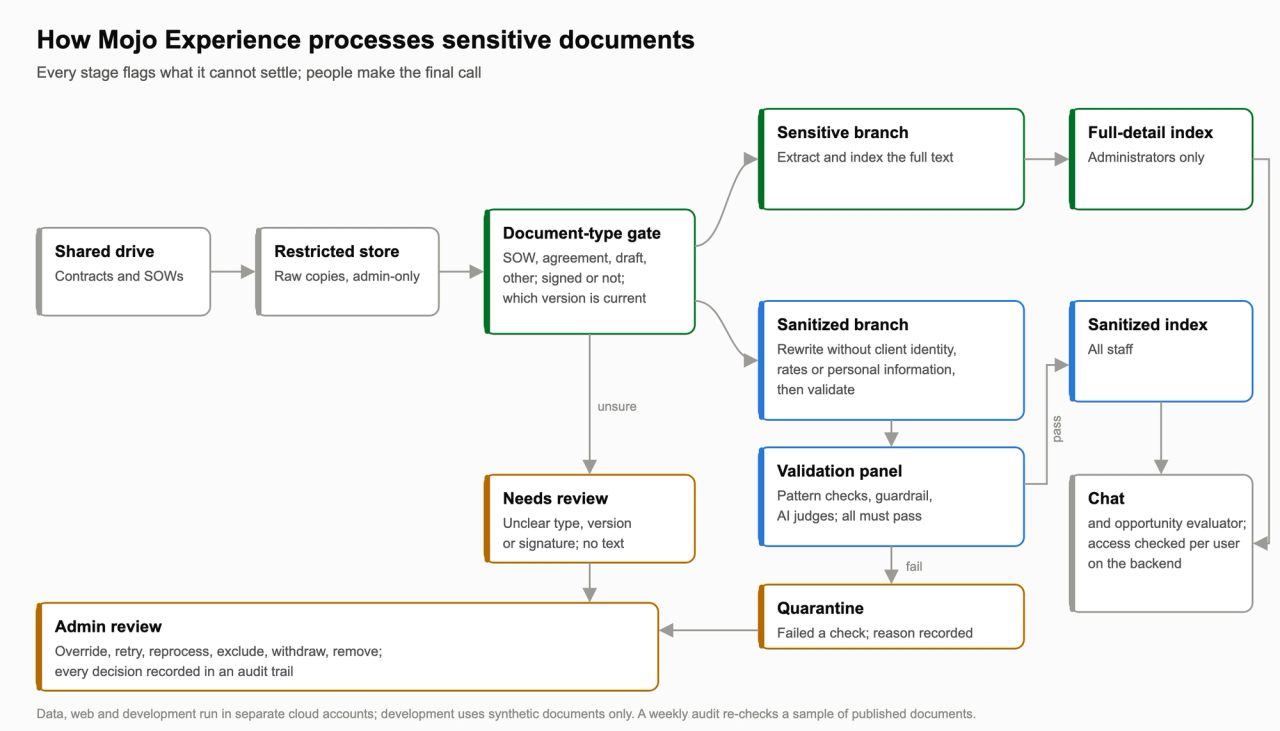
Figure 1. How Mojo Experience processes sensitive documents. Every stage flags what it cannot settle, and people make the final call.
Lesson 1: Understand your documents before you design the pipeline#
The first design assumed every file in the drive was a SOW. The real drive mixed master agreements, drafts, and executed SOWs in the same client folders. The pipeline would have treated agreements as SOWs and counted a draft and its signed copy twice. Before the production migration, I added the document-type gate. It labels each file, prefers the executed copy over drafts, and sends unclear cases to an administrator.
My first rule was to store master agreements without making them searchable. Two days later I reversed it. Those agreements matter to the people who use the tool, so they became searchable, but only by administrators and only when they choose to include them.
Look-alike documents were harder. In a live evaluation, an agreement shaped like a SOW, with no SOW number but the same title as a real SOW in the same folder, replaced that SOW as if it were a newer version. The fix makes document numbers take precedence over titles. The next live evaluation raised the score for choosing the right version from 87.4% to 92.3%. That is still short of our 95% target. The remaining misses involve documents whose signed status is hard to determine, and that work is still open.
Lesson 2: Expect dirty data, and build the review system alongside the pipeline#
The production data was dirty, and cleaning it became one of the largest parts of the build. The drive held drafts next to their signed copies, agreements filed as SOWs, scans with no readable text, and preview images saved inside design-tool files. Employee records had their own problems: former staff and shared mailboxes looked like people, and a later employee could reuse an email address. None of that showed up in our synthetic test data.
Most of the answer was not smarter AI. It was a way for the system to say “I’m not sure” and for a person to decide. Each stage flags what it cannot settle, with a reason, instead of guessing. The document gate sends a file to a review queue when its confidence is low, when it cannot tell whether a document was signed, when two versions match ambiguously, or when the file has no text. The sanitized branch quarantines any document that fails a check and records why. A weekly audit samples documents that already passed, and people records with conflicts go to an identity review.
Administrators work those queues in the admin pages. They can override a classification, retry or reprocess a file, exclude it, withdraw it from a tier, mark it as not a document, or remove files in bulk. Each action is recorded in an audit trail. I set a rule that anything an engineer could fix from the command line also had to be possible from the admin pages, because administrators are business users and, depending on the engineer, had become the bottleneck.
Expect the same in your own data. Before you process anything at scale, decide how the system will mark bad or questionable records, who reviews them, what decisions they can make, and how each decision is recorded. Then watch the queue size. It tells you how well the pipeline understands your data.
Lesson 3: Budget for reprocessing, not just the first pass#
Development used synthetic documents, which kept real client data out of the environment and under different access controls than production. That protection had a cost: the synthetic set did not contain the mix we found in the real drive. Master agreements, drafts, look-alike documents, and combined agreement-and-SOW files only appeared in production. Each discovery changed a rule, and each rule change meant rerunning part of the real collection through the pipeline.
Our collection was about 1,100 files. That is the size of pilot we would recommend to any client: large enough to contain the real sample of your document types, small enough to reprocess cheaply while the rules settle. The first full pass over the production drive cost about $150 to classify 1,116 files and fully analyze roughly one-third of them, or about $0.35 per fully analyzed PDF. That figure includes text extraction paid with cloud credits; the Claude share was about $90.
The reprocessing that followed cost roughly $80 more. Re-classifying about 560 agreements after the master-agreement rule changed cost about $36. Re-mapping about 700 document profiles to a new skills catalog cost an estimated $12. Re-running about 100 sanitized documents after rule fixes was budgeted at about $30. Live classifier evaluations added about $20 across several runs. For MojoTech, these numbers are small. The pattern matters more than the totals: reprocessing has already cost about half as much as the first pass, and it is not finished.
Scale changes that. At our measured rates, a first pass over 300,000 documents would cost about $43,000: about $13,500 to classify everything and about $29,000 to fully analyze a third of them. Each later re-classification would add about $12,000. At 1,000,000 documents, the first pass would be about $142,000 and each re-classification about $40,000. At the requested rates and within our production quota, a single pass would take days to weeks rather than hours. These are straight-line projections from our 2026 costs at list prices; batch or volume pricing could lower them, and I have not measured that.
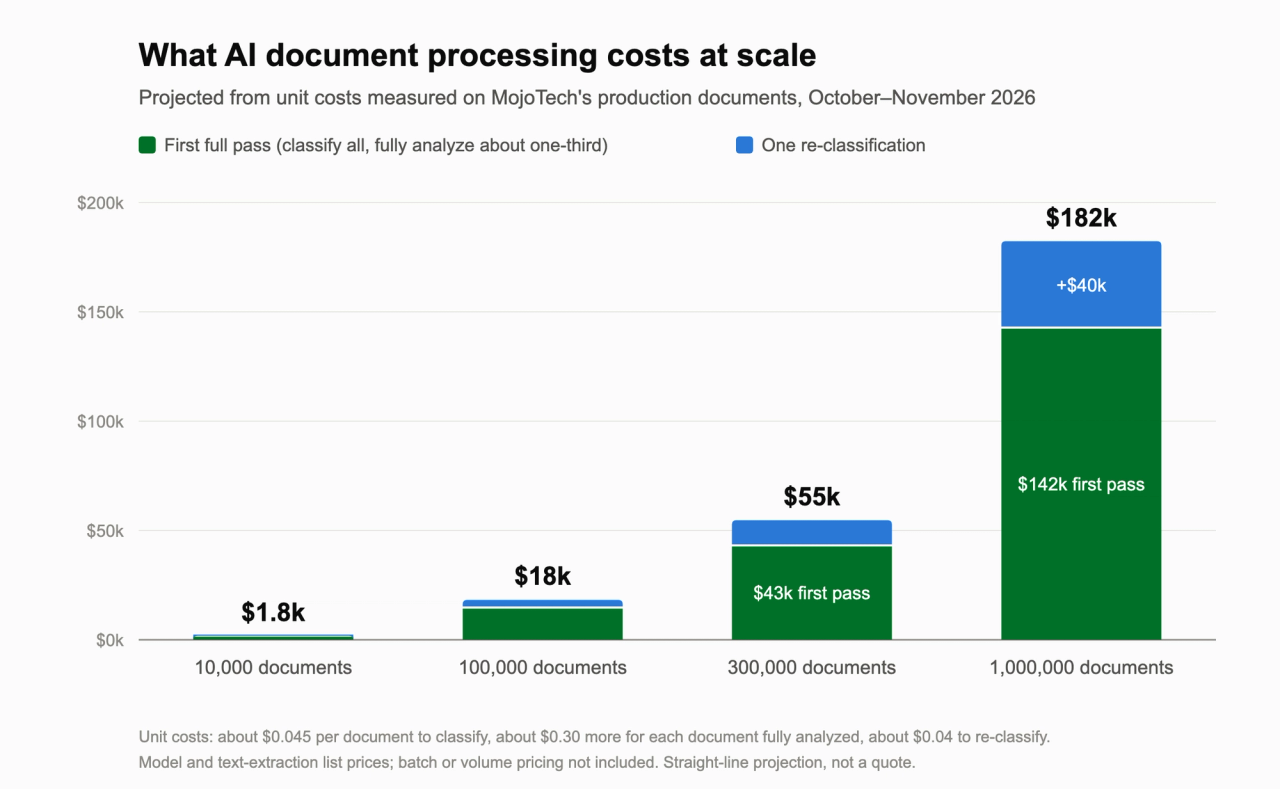
Figure 2. Projected first-pass and re-classification cost at 10,000, 100,000, 300,000, and 1,000,000 documents, from unit costs measured on our production documents (2026, list prices).
I would not approach reprocessing the same way at that scale. Before processing a large collection, build a working sample from the real documents. It should cover the bulk document types in their real proportions, plus deliberate examples of the outliers: drafts, look-alikes, combined documents, scans and images. Label it, tune the classification against it, and run a priced pilot before processing the full collection. Keep the stages separate so that a classification change re-runs only the cheap step, and skip analysis for any document whose classification did not change. We added that last part partway through, and it is why re-classifying the agreements costs about $0.04 a file instead of a full analysis.
Platform limits shape the timeline as much as the budget. Production started with no usable model quota: one day, a request for 10,000 requests per minute was denied when our real need was about 20, and the next day a working quota was in place. That quota is why the estimate above runs to days or weeks. The data stack also hit CloudFormation’s 500-resource limit and had to be restructured shortly after. Check quotas and service limits before you commit to a schedule.
Lesson 4: Measure the AI that checks the AI#
Sanitizing is the core risk. A rewrite can remove a client’s name and still leave a description specific enough to identify them. We use AI judges to look for leaks like that, and we had to measure the judges themselves.
We planted known leaks in synthetic documents and counted how many the judges caught. Obvious leaks were caught every time. Subtle ones, such as approximate rates or descriptions that point to a client, were caught 66% of the time at first. Prompt changes raised that to 73%, which I accepted to close that phase of the work. Later, a prompt written as an explicit policy caught 345 of 400 planted leaks, with none of the 40 clean documents wrongly quarantined. Two alternative models tested as judges the same day were rejected because both flagged clean documents as leaks.
The policy prompt shared ideas with the planted leaks it was measured on, so that result could overstate its effectiveness. To check it, we wrote a second set of leaks without looking at the prompt. The best prompt version scored 84.2%. I documented the result and the missed leaks. I wanted to use a more capable model for validation, but accepted the current model’s accuracy for production with the additional security controls in place. That decision relied on defense in depth, which Lesson 6 describes: no single check decides whether a document is published.
Lesson 5: Verify that models and guardrails behave as you expect#
We later confirmed that the managed guardrail on sanitized chat answers was not actually checking them. Answers come back as structured tool output, which that guardrail path does not assess. Other layers still applied, but the last backstop was checking nothing. The fix checks each answer after the model returns it. Its first version blocked legitimate answers that contained colleagues’ names. After several rounds of quality and security review, the corrected version passed our production check.
Formatting changes had side effects too. At one point, asking for Markdown-formatted answers caused one model to return its structured output as malformed text in 11 of 12 test runs. Forcing strict structured output fixed the format but made that model answer “not found” on most questions, so the answer step moved to a different model that handled both. Model choice now has to be tested for each role, not assumed.
Search had its own limit. The system searches by meaning, and at one point a question naming a client returned nothing. The query planner had padded the question with generic phrases such as “statement of work,” which matched every document and buried the name. We fixed this by adding a name lookup alongside semantic search, so it could match client names directly.
Lesson 6: Never let one layer decide alone#
Guardrails and AI models are probabilistic. They catch most problems, not all of them. We use defense in depth: overlapping checks, human review, and ongoing audits reduce the chance that a failure in one layer lets a problem pass unnoticed. Every sanitized document must pass deterministic pattern checks, a managed guardrail, and independent AI judges running on a different model from the one that wrote the rewrite. Anything flagged goes to quarantine for a person to review, and a weekly audit samples documents that already passed. The layers fail in different ways, which is the point: at one point we found that the guardrail on chat answers wasn’t checking them at all (Lesson 5), while the other layers were still in place.
Lesson 7: Treat consistency between access tiers as a control#
With two independent branches, the tiers can drift apart. I set a rule: a sanitized document with no sensitive copy is a defect, while a sensitive document waiting in quarantine for its sanitized copy is an acceptable lag. Earlier checks compared totals, which cannot show which files differ, so we built a per-file check. Another review found 334 SOWs published in the sensitive tier, 275 published in both tiers, 59 sanitized copies held in quarantine, and none in the sanitized tier alone.
Recommendations#
Keep the models inside your security boundary. Run them through your cloud provider’s managed service, such as Amazon Bedrock, with each step limited to the models it needs, so sensitive text never reaches an outside AI provider.
Start with a priced pilot on your real documents. Build a labeled sample that covers the common document types in their real proportions and the outliers on purpose, and keep stages separate so a rule change re-runs only the cheap step.
Design the review queues before you scale: how the system marks questionable records, who reviews them, what they can decide, and how each decision is recorded.
Keep part of your evaluation set blind. A result you tuned against is not evidence.
Put a person on the team to make decisions and review every change before it merges. When you accept a risk, record the finding, the reason, and the owner. On this project, that person was me, working with AI agents whose quality and security reviewers could read the code but not change it.
Mojo Experience shows that one engineer can build and operate this architecture securely with a team of AI agents. Whether it pays off for users is still being measured, and I will report on that as evidence comes in.
If you are planning AI over tens or hundreds of thousands of sensitive documents, MojoTech can help you design the pilot, the review system and the cost model before you commit to the full run.